|
SEARCH THIS SITE 
Custom Search
|
|
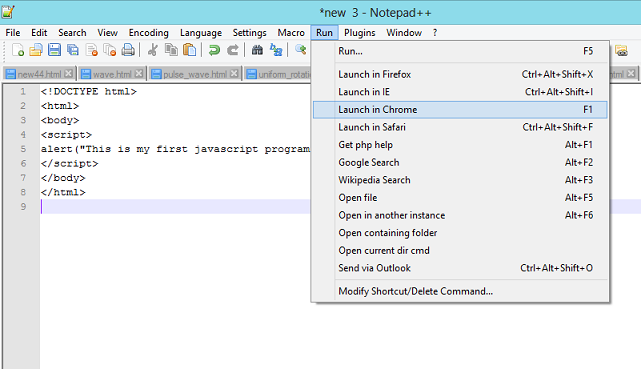
In order to write and develop javascript programs, you need an editor. I suggest that you download the free code editor Notpad++ (click on "Notepad++ Installer" it is the easiest to install). You also need to to check your JavaScript source code for common mistakes. I suggest the online use of JavaScript Lint. 1 - Download Notepad++, install it and run javascript programsDownload Notpad++ and follow instructions to install it. Open a new file. Copy and paste the following code into the new file area; then save the file with html extension.
<!DOCTYPE html>
<html> <body> <script> alert("This is my first javascript program !!"); </script> </body> </html> Then click on run (as shown below) and select any of the browser in your computer. I have selected Chrome in this example.
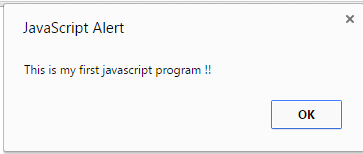
The alert window with the message "This is my first javascript program !!" as shown in the picture below should appear.
2 - Use "JavaScript Lint" to detect errors in a javascript programWe now examine the use of "JavaScript Lint" to check a javascript program. Click on JavaScript Lint so that it opens in another window as shown below.
Copy and paste the program below and run it in Notepad++, nothing happens. Let us see why Copy and paste the javascript program shown below and paste into the blank area of "JavaScript Lint" then click on the button "Lint" located below the blank area.
<!DOCTYPE html>
<html> <body> <script> alert("This is my first javascript program !!"); </scrip> </body> </html> The "JavaScript Lint" repotrs an error somewhere in the program. The closing tag </srcip> needs a "t" at the end and has to be written as </srcipt> .
Now that you know how to run and check programs with javascript elements, let us start developing canvas programs. More Free HTML5 Canvas Tutorials
|
 .
.
 .
.
 .
.
 .
.